
|
CAD and RMS Systems
Altaris CAD
Computer Aided Dispatch System
 |
|
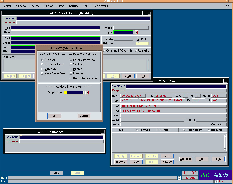
Altaris™ CAD is a mission critical decision
support system that enables communications center personnel to
more appropriately manage calls for service and response resources.
Altaris™ CAD provides information when and where it is needed
to efficiently support the command and control operations of public
safety agencies. The system allows communications personnel to
readily access information and to make appropriate decisions in
meeting the demand for police, fire and emergency
Altaris™ CAD Screen medical services. |
Altaris™ CAD Screen
|
While enhanced operation of the emergency
communications center may represent the most visible impact of
Altaris™ CAD, the system provide operational benefits throughout
public safety departments and ultimately to the citizens of the
communities served by the system.
Altaris™ CAD is a true client/server system designed to
offer the following system level features:
| |
Portability - Altaris™ CAD
will operate across multiple hardware and operating system platforms.
You select the best configuration for your environment. |
| |
Scalability - Altaris™ CAD's
building blocks approach will facilitate small system to very large
multi-jurisdictional systems. The design facilitates expansion as
requirements increase. |
| |
Reliability - Altaris™ CAD's
integrated redundancy and failover offers optimum uptime reliability. |
| |
Performance - Altaris™ CAD will
provide optimum response time and throughput to support the most
demanding operations. |
Altaris™ CAD is an extremely versatile system offering the
following user agency level features:
| |
Multiple Service Capability - Altaris™
CAD is designed to accommodate multiple class,
multiple agency and multiple jurisdiction operations.
The autonomy of an agency is preserved through the agency/data
group configuration. An agency may define unique data values
and functionality applicable only to their agency in a
multi-agency operation. |
| |
Flexibility - Altaris™ CAD is
designed with over 50 dynamic option settings that allow user
agencies to determine functionality on-line. Altaris™ CAD
offers unparalleled flexibility with table driven functionality.
Altaris™ CAD's design is to provide a maximum level of user
customization without source code modification. |
| |
Seamless Integration - Altaris™
CAD is designed to operate in a complimentary, seamless manner with
AltarisVIEW™ (mapping) Altaris™ RMS and interfaces to
external systems. |
Altaris™ CAD user level features include:
| |
Full Function Windowing Environment
- An extremely friendly graphic user interface is standard in
Altaris™ CAD. Altaris™ CAD operates on the work
environment concept where up to 15 interactive working windows
may be opened at any time. |
| |
Enhanced Status Monitoring - Altaris™
CAD provides the capability to configure status monitors. Users can
determine the nature of the status monitor displays. Monitors may
be dynamically resized. |
| |
Command Versatility - Altaris™
CAD offers maximum versatility in issuing commands. Command line
transactions may be keyed in several variations. Altaris™ CAD
offers point and click options to command line transactions at
appropriate points in the workflow. |
Altaris RMS
Records Management System
 |
|
A tightly
integrated decision support system, Altaris® RMS was designed
to meet the needs of the public safety community by delivering
information essential to making critical decisions.
PRC's 37 years of public safety experience provided the basis used
to create a robust RMS with a graphical user interface that makes
the system easier to learn and use. PRC's RMS is part of the
Altaris® product suite. |
Altaris™ RMS Screen
 |
There is no need to re-key data or update numerous other
applications. Information need only be entered once.
Data is automatically shared between PRC's Altaris® RMS and
CAD systems. The Altaris® RMS system provides the ability to
track comprehensive event details such as response times, personnel
involved, location, date/time, type. This information may then be
used to pinpoint trends such as peak hours and high-risk areas.
Functionality offered by Altaris® RMS provides a comprehensive
response to all records requirements.
Some of the highlights of the Altaris® Records Management System are outlined below.
Graphical User Interface (GUI) Functions
As with the Altaris® CAD product, Altaris® RMS also
provides the user with the use of a feature-rich graphical user
interface. The GUI reduces the number of steps it takes to perform
any function within the system, which not only makes the system
easier to use, but easier to learn. The extensive use of windows,
pull-down menus, graphical display buttons and icons help the
operator perform the task at hand. On-line help is available to
the RMS user.
The GUI also provides each operator with the ability to choose the
method of operation. For most operations, keyboard entry, function
keys or point-and-click mouse device may be used, depending on
individual operator preference.
Altaris® RMS also provides step-by-step guidance for entering
incident details such as exposure information (including ignition
factors), structural and/or mobile information, damage loss estimates,
injuries and fatalities, firefighter exposures and emergency medical
information. Altaris® provides the user with the ability to tailor
the flow of data capture (as described above) so that the data entry
process is both smooth and complete.
General RMS Functions
In addition to the functionality of the specific modules
described above, Altaris® RMS provides general functionality.
Altaris® RMS provides a very extensive personnel module.
This module is used to capture employee information such as
employee experience, education, training, specialized skills,
job assignments, certification, injuries and drivers license
information.
Electronic mail capability is also provided to the RMS users.
This allows the RMS user to communicate with other network users,
including CAD users. The RMS users will also be able to access the
existing electronic mail facilities.
Altaris® RMS provides a built-in spell checker that is
available for use in all of the text narrative fields that are
associated with the narrative text fields.
Extensive reports are provided that will let the user manipulate
and analyze data so that operations may be streamlined and costs
reduced. Reports can profile field incidents, permits and
certificates, hazards, inspection histories, personnel
information and fire safety.
Altaris® JMS
Jail Record Management System (JMS)
 The Altaris® Jail
Record Management System (Jail RMS) has taken the features and
benefits of traditional RMS systems, including Criminal Justice
Information Systems (CJIS), and integrated these features and
benefits using a well thought-out and structured system design.
Jail RMS is a major component of Altaris® RMS and is fully
integrated with the Police module of Altaris®. Jail RMS is also
integrated with the Personnel, Assets, Inventory, and
Administration components of Altaris®.
The Altaris® Jail
Record Management System (Jail RMS) has taken the features and
benefits of traditional RMS systems, including Criminal Justice
Information Systems (CJIS), and integrated these features and
benefits using a well thought-out and structured system design.
Jail RMS is a major component of Altaris® RMS and is fully
integrated with the Police module of Altaris®. Jail RMS is also
integrated with the Personnel, Assets, Inventory, and
Administration components of Altaris®.
A database structure designed for Jail RMS inherently resolves many
of the problems associated with previous generations of systems.
This structure significantly improves performance and, at the same
time, provides a feature-rich environment. Many of the features and
benefits offered in this system could not have been implemented under
older-style systems. The overall structure of Altaris® Jail
RMS makes full use of the advantages of a true relational database.
To reduce the risk associated with developing this type of system,
an industry leading product, Oracle's Relational Database Management
System (RDBMS), has been selected to comprise the database engine
and ORACLE Forms is used to support the applications.
Altaris® Jail RMS is a fully integrated RMS that is revolutionizing
how jails view record management systems. The most exciting result
is the capability to easily access information that accrues in the
normal course of jail operations. Officers and/or records personnel
enter or augment information into Altaris® RMS through a user
friendly "windows" environment. Since every Agency is different,
Altaris® RMS allows each Agency to establish a unique
"workflow". The workflow is the order in which data
(booking, medical, classification, property, etc.) is
entered into Altaris® RMS. An authorized user without
programming support or system modifications maintains the
workflow on-line.
Gathering and recording relevant data can be difficult. Although
jail agencies are awash with files, records and paper, there is
seldom a central facility for storing, retrieving and, most importantly,
relating these diverse data. Altaris® Jail RMS greatly
alleviates these difficulties by streamlining the duties of
Jail personnel and eliminating redundant data entry.
Altaris® Jail RMS was designed to facilitate information flow
from initial intake of an inmate from either arresting agencies or
court agencies through final release. A series of integrated
modules record information on booking, classification, medical screening
and medical visits, property, supplies issued, inmate program
needs, inmate accounts, event scheduling, visitation, kitchen
menus and inventory, and support additions and/or corrections to
this information.
 A GUI Interface
A "windows" standard Graphical User Interface (GUI) makes
information easy to discern and system usage intuitive, while
minimizing complexity by reducing the number of steps required to
perform an operation. Altaris® Jail RMS follows defacto industry
standards, making use of common GUI features such as pull-down
menus, pop-up windows, and action buttons.
A GUI Interface
A "windows" standard Graphical User Interface (GUI) makes
information easy to discern and system usage intuitive, while
minimizing complexity by reducing the number of steps required to
perform an operation. Altaris® Jail RMS follows defacto industry
standards, making use of common GUI features such as pull-down
menus, pop-up windows, and action buttons.
Transitioning to the Jail RMS interface is easy for users with
basic knowledge of "windows" based applications such as:
Microsoft Windows, IBM's OS/2, and Apple's Macintosh. Jail RMS
employs a standard format for all application windows (forms) across
system components. The common user interface allows users to
quickly get up to speed using forms and functions.
Field Prompting and Completeness Checking
When the cursor is positioned on a field or an action is initiated
in Altaris® Jail RMS, the prompt area on the bottom of the
screen automatically displays relevant information. In addition,
the system permits the user to perform completeness checks on entered
data ensuring that the entered information is complete.
Enhanced Data Integrity
Altaris® Jail RMS is based on the latest version of the Oracle
Relational Database Management System (RDBMS), an implementation
that embraces both entity and referential integrity rules. However,
the quality of the data in a database is only as good as the quality
of the data entered into it. To help ensure the consistency of data
entered into the database, Altaris® Jail RMS includes a
sophisticated list of values (LOV) mechanism. Every field that can
be defined by a list of values has an LOV button and supporting data
structure. The LOV data contains each valid entry for the specified
field, and because lists are dynamic, additional values can be easily
entered or phased out "on the fly" by authorized users. Values may be
phased out by entering an expiration date. If an LOV value has expired,
the user may search for old records using the value but may not
enter the expired value for new records.
Integrated with Personnel, Assets and Inventory Subsystems
One major benefit of a well designed, integrated records management
system is that redundant processes and data are identified and
eliminated. If consumable items are purchased within the Commissary,
kitchen ingredients are used in meal preparation, or supplies are
issued to an inmate, then inventory adjustments and requisitions
will be performed automatically. Altaris® Jail RMS supports
all of these integrated functions and more, including integration of
the Jail component with the Police component. The integration is
fully seamless and transparent to the user, providing a single point
of data entry.
Integrated with Police
Jail and Law Enforcement agencies are both in need of the same kinds
of information, usually with different viewpoints. The Altaris®
Jail suite provides the ability to enter and retrieve defendant,
warrant, arrest, charge, and court case data that may have been
previously entered in the Police module; data entered in Jail is also
available to Police. This aggregated information allows the Jail
staff to more efficiently process an inmate into the facility,
without having to re-enter data.
Jail Set-up
The first task when configuring Jail RMS for a new Jail agency is
to add the agency to the system and set the agency-specific parameters,
such as sales tax rate, whether to check for event conflicts, and
whether inmate accounts are allowed to go negative. Note that a Jail
may be defined as a separate agency unto itself, or may be
combined with a Police agency, depending on the user's process requirements.
Another important setup function enables customization of the Altaris®
Jail RMS workflow. The system can be tailored to present blocks or
work, or screens, in the order that best suits agency requirements.
In addition, the workflow can be changed at any time without affecting
the data, so it can be "tweaked" as necessary to find the optimal
approach.
 Inmate Tracking
This application provides the core functionality to record overall
information related to the inmate, starting with the intake process.
The following information may be recorded: Related Stays, Arrest
and Charge Data, Property, Supplies Issued, Phone Calls, Officers,
Primary Classification, Initial Medical Assessment, Inmate Program
Needs, Narratives, and Persons to Notify Upon Release.
Inmate Tracking
This application provides the core functionality to record overall
information related to the inmate, starting with the intake process.
The following information may be recorded: Related Stays, Arrest
and Charge Data, Property, Supplies Issued, Phone Calls, Officers,
Primary Classification, Initial Medical Assessment, Inmate Program
Needs, Narratives, and Persons to Notify Upon Release.
Post-Intake
Inmate processing is an on-going process and requires many updates
after the initial booking. In addition, changes may be made to the
inmate's classification, medical screening, cell assignment, program
needs, etc. This section allows the user to quickly enter and track
these changes in Jail RMS without having to go through Inmate
Tracking.
Commitments
This application provides the ability to query for a defendant name
and retrieve the associated charges, court case, and sentence data
that was previously entered by a court system. This allows the jail
staff to proceed to book the inmate without having to re-enter data and
to track court data associated with an already booked inmate. This module
allows the user to manually enter this information, should an
automatic interface not be defined or should the interface be down.
Automatic sentence calculation also occurs, taking into account the
concurrent/consecutive status of individual charges, as well as
whole cases. Good Time is calculated, pay/stay time (time which must
be served unless a specified fine is paid) is tracked, and alternative
sentences are managed, including any time multipliers that may need to
be applied.
Commissary
This module allows the user to track inmate commissary purchases
and indigent package distribution. Adjustments to inventory are
automatically applied, and appropriate accounting transactions occur
transparently in the background. Potential pick-lists may be
printed for inmate submission, and controls may be applied in terms
of the amount of money an inmate may spend on a given commissary
purchase, as well as capping the number of specific items that may
be purchased on an item-by-item basis.
 Confidential Medical
Inmates may have confidential medical histories or conditions.
Jail RMS allows this information to be entered, maintained,
and used. This module is also fully integrated with the accounting
module, so that charges for prescriptions and medical visits are
applied automatically. As a convenience, event logging associated
with medical visits may be performed from this module.
Jail Events
This application provides a convenient scheduling function that
allows the user to enter and track any number of events (exercise,
visitation, court appearances, etc.) that affect the operation of
the facility. Through this module it is also possible to log and
track inmate movement to and from the events. All inmate scheduling
and logging is conducted through the Jail Events application. A
number of automatic checks are performed, such as ensuring that
multiple events are not scheduled for the same place at the same
time, inmates are not scheduled for multiple events at the same time,
the number of scheduled inmates does not exceed the capacity of the
event or the designated location, and inmates who are designated
"Keep Separate" are not scheduled together.
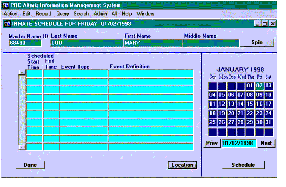 Several possible Event screens are provided in order to give the
most flexibility to the staff. The main Event screen allows the
user to see all of the events for a given day, or to filter based
on event type and/or event location. An Inmate Event screen is
also provided to show only events associated with a given inmate.
Also, a Dorm Officer Event screen is provided, displaying only events
associated with those inmates housed in the same dorm.
Several possible Event screens are provided in order to give the
most flexibility to the staff. The main Event screen allows the
user to see all of the events for a given day, or to filter based
on event type and/or event location. An Inmate Event screen is
also provided to show only events associated with a given inmate.
Also, a Dorm Officer Event screen is provided, displaying only events
associated with those inmates housed in the same dorm.
Occurrence Processing
This application tracks occurrences that fall outside the scheduled day-to-day activities of the jail. The application provides for capturing a variety of occurrences within the jail and linking the required reports to each occurrence, including tracking of any disciplinary actions which may be associated with the occurrence. In addition to "disciplinary type" reports, the application provides for capture and tracking of inmate grievances.
Shakedown
It may be necessary from time to time to perform a cell shakedown. This module notes which cells are searched, which officers are involved in the process, and what contraband, if any, is found in the shakedown.
Release
Upon probation, completion of the sentence, or bond out, an inmate is released. Jail RMS performs extensive cross-checking to ensure that the inmate is cleared for release (such as checking bond statuses, charge statuses, and warrant/hold statuses). It also provides swift access to the necessary modules for releasing an inmate's property, vehicle, and account funds, as well as returning supplies and performing other tasks prior to the inmate's release, such as contacting Persons to Notify Upon Release.
Bond Processing
Inmates may have bond assigned; this bond information must be tracked. This bond information may be automatically assigned (based on charge), or may be manually entered at either the charge or case level. If an inmate posts the assigned bond amount, they may be released, at which time the bond is processed and bond receipt(s) are printed. Information pertaining to the court-mandated types of bond allowed and persons posting the bond are also recorded.
Inmate Holds
Jail RMS enables the agency to maintain necessary records on inmates whose cases involve "holds" from other jurisdictions and display any active wants/warrants from other agencies within the current jurisdiction. Warrants entered through the Police module automatically appear on this form. Also, all of this information is checked prior to releasing an inmate.
Public Information
This module allows certain information to be quickly released to the public without jeopardizing the rights of the inmate. This module also allows information pertaining to the persons requesting this information to be tracked.
Inmate Accounts
Most facilities are "cashless", however, inmates are permitted to work, earn funds and purchase goods. The accounting application is highly customizable, allowing each agency to specify the degree to which individual transactions should be uniquely tracked. Through this module, otherwise transparent transactions (from commissary or confidential medical) may be viewed and, to a degree, modified. Additional transactions, such as inmate deposits and disbursements, may be created from these screens.
Kitchen
This application allows the user to store recipes, maintain kitchen inventory, plan menus and administer other activities relating to the preparation of the inmates' food. Nutritional information is tracked at the item, recipe, and menu levels, and special diets are taken into account for those inmates with additional dietary needs.
Work Program
This application administers information about inmates involved in any work release programs that may be available. This segment also maintains data about the employers, types of jobs available, and other pertinent information. As a convenience, event logging associated with work programs may be performed from this module.
Searches
Jail RMS provides a number of standard searches to locate specific sets of information. These powerful searches enable the user to specify search criteria, to recall and refine the search criteria, and to obtain specific and/or related information. The types of searches include: Name Search, ID Search, Inmate Locator, Inmate Log, Account History, Facility/Block/Cell Search, Officer Search and Phone Call Search.
Reports
To assist in managing the facility, Jail RMS provides standard reports including: Available Cells, Inmate Phone Call Listing, Inmate Classification, Inmate Records, Inmate Roster, Confidential Medical, Daily Event Schedules, Accounting Transactions, Jail Statistical Analysis, and Release Reports.
Special Information
To provide immediate access for critical information related to an inmate, Altaris® Jail RMS provides for defining and notifying the user of the existence of Special Information and Caution data. The data is defined via LOVs; as such, the user is free to apply their own definition of such data. This information is easily accessible throughout the system, and can be accessed quickly for use in time-sensitive decisions.
Administration
To ensure that the Jail subsystem is properly set up for the facility, Jail RMS permits the user to customize the system through data fields. Customization through data eliminates the need for programming support and allows the user to maintain customization on-line. Some of the areas that may be customized include: Facility/Cell, Visitor Areas, Schedule Events, Event Types, Offense List, Medical Questions and Classification Questions.
Litton PRC
Altaris Jail Record Management System
Inmate Booking
- Captures basic information, such as name, physical description, address, associates
- Performs medical screening and inmate classification
- Collects property and issues supplies
- Assign cells based on age, sex, and classification
- Records arrest and charge information
- Records additional information, including Persons to Notify upon inmate's release, visitor information, program needs, and phone calls
Commitments
- Calculates release dates based on Court-supplied commitment data
- Calculates Days to Serve for 'Weekender' inmates
- Incorporates Good Time, Pay/Stay time, and program modifiers
Medical
- Tracks allergies and prescriptions
- Tracks medical conditions, including descriptions of condition and treatment, Vital signs, and Medical visits, fully integrated with the Event Tracking module
Event Tracking
- Schedules unique and recurring user-defined events
- Schedules and logs inmates and employees into events
- Automated conflict checking: 'Keep Separate', event location conflicts, inmate attendance conflicts, inmate attendance conflicts, capacity checks, and more.
- View scheduled events from different points of view:
- Main - display scheduled events based on event type and/or event locations
- Inmate - view only events scheduled for a given inmate
- Dorm Officer - view only events for which inmates in the Dorm are currently scheduled
Release
- Performs releases: 'Final' releases, Temporary 'Weekender' releases, and Bond Outs
- View inmates scheduled for release within any date range
- Shortcuts to all release actions (cut a check, return property, collect supplies, etc.)
Accounting
- Inmate Trust Accounting - fully integrated with Commissary and Medical modules.
- Jail Accounting - manage the Jail's account, filling the gap between the Inmate Trust Account and the Jail's financial institution
- Fee Accounting - assess any fees and determine payment schedules
Commissary
- Track Commissary purchases, fully integrated with Accounting and Inventory modules
- Generate commissary pick lists
- Manage Indigent package distribution
Kitchen
- Creates recipes and menus (integrated with Inventory module)
- Manages Inmate nutritional needs
- Tracks special dietary restrictions
- Forecasts future inventory needs
Dorm Occurrence Processing
- Shakedowns, grievances, and disciplinary disturbances
- Records inmates involved and resulting actions taken
Bond processing - charge and case level bonds, automated bond assignment
Holds - manages inmate holds for other agencies
Work Programs - alternative sentences
Reports and Searches - numerous means of viewing Jail data
Altaris Jail Record Management System
The Altaris Jail Record Management System (Jail RMS) has taken the features and benefits of traditional RMS systems, including Criminal Justice Information Systems (CJIS), and integrated these features and benefits using a well thought-out and structured system design. Jail RMS is a major component of Altaris RMS and is fully integrated with the Police module of Altaris. Jail RMS is also integrated with the Personnel, Assets, Inventory, and Administration components of Altaris.
A database structure designed for Jail RMS inherently resolves many of the problems associated with previous generations of systems. This structure significantly improves performance and, at the same time, provides a feature-rich environment. Many of the features and benefits offered in this system could not have been implemented under older style systems. The overall structure of Altaris Jail RMS makes full use of the advantages of a true relational database. To reduce the risk associated with developing this type of system, an industry leading product, Oracle's Relational Database Management System (RDBMS), has been selected to comprise the database engine and ORACLE Forms is used to support the applications.
Altaris Jail RMS is a fully integrated RMS that is revolutionizing how jails view record management systems. The most exciting result is the capability to easily access information that accrues in the normal course of jail operations. Officers and/or records personnel enter or augment information into Altaris RMS through a user friendly "windows" environment. Since every Agency is different, Altaris RMS allows each Agency to establish a unique "workflow". The workflow is the order in which data (booking, medical, classification, property, etc.) is entered into Altaris RMS. The workflow is maintained on-line by an authorized user without programming support or system modifications.
Gathering and recording relevant data can be difficult. Although jail agencies are awash with files, records and paper, there is seldom a central facility for storing, retrieving and, most importantly, relating these diverse data. Altaris Jail RMS greatly alleviates these difficulties by streamlining the duties of Jail personnel and eliminating redundant data entry.
Altaris Jail RMS was designed to facilitate information flow from initial intake of an inmate from either arresting agencies or court agencies through final release. A series of integrated modules record information on booking, classification, medical screening and medical visits, property, supplies issued, inmate program needs, inmate accounts, event scheduling, visitation, kitchen menus and inventory, and support additions and/or corrections to this information.
A GUI Interface
A "windows" standard Graphical User Interface (GUI) makes information easy to discern and system usage intuitive, while minimizing complexity by reducing the number of steps required to perform an operation. Altaris Jail RMS follows defacto industry standards, making use of common GUI features such as pull-down menus, pop-up windows, and action buttons. Transitioning to the Jail RMS interface is easy for users with basic knowledge of "windows" based applications such as: Microsoft Windows, IBM's OS/2, and Apple's Macintosh. Jail RMS employs a standard format for all application windows (forms) across system components. The common user interface allows users to quickly get up to speed using forms and functions.
Field Prompting and Completeness Checking
When the cursor is positioned on a field or an action is initiated in Altaris Jail RMS, the prompt area on the bottom of the screen automatically displays relevant information. In addition, the system permits the user to perform completeness checks on entered data ensuring that the entered information is complete.
Enhanced Data Integrity
Altaris Jail RMS is based on the latest version of the Oracle Relational Database Management System (RDBMS), an implementation that embraces both entity and referential integrity rules. However, the quality of the data in a database is only as good as the quality of the data entered into it. To help ensure the consistency of data entered into the database, Altaris Jail RMS includes a sophisticated list of values (LOV) mechanism. Every field that can be defined by a list of values has an LOV button and supporting data structure. The LOV data contains each valid entry for the specified field, and because lists are dynamic, additional values can be easily entered or phased out "on the fly" by authorized users. Values may be phased out by entering an expiration date. If an LOV value has expired, the user may search for data using the value but may not enter the expired value.
Integrated with Personnel, Assets and Inventory Subsystems
One major benefit of a well designed, integrated records management system is that redundant processes and data are identified and eliminated. If consumable items are purchased within the Commissary, kitchen ingredients are used in meal preparation, or supplies are issued to an inmate, inventory adjustments and requisitions will be performed automatically. Altaris Jail RMS supports all of these integrated functions and more, including integration of the Jail component with the Police component. The integration is fully seamless and transparent to the user, providing a single point of data entry.
Integrated with Police
Jail and Law Enforcement agencies are both in need of the same kinds of information, usually with different viewpoints. The Altaris Jail suite provides the ability to enter and retrieve defendant, warrant, arrest, charge, and court case data that may have been previously entered in the Police module; data entered in Jail is also available to Police. This aggregated information allows the Jail staff to more efficiently process an inmate into the facility, without having to re-enter data.
JAIL RMS OVERVIEW
Jail Set-up
The first task when configuring Jail RMS for a new Jail agency is to add the agency to the system and set the agency-specific parameters, such as sales tax rate, whether to check for event conflicts, and whether inmate accounts are allowed to go negative. Note that a Jail may be defined as a separate agency unto itself, or may be combined with a Police agency, depending on the user's process requirements.
Another important setup function enables customization of the Altaris Jail RMS workflow. The system can be tailored to present blocks or work, or screens, in the order that best suits agency requirements. In addition, the workflow can be changed at any time without affecting the data, so it can be "tweaked" as necessary to find the optimal approach.
Inmate Tracking
This application provides the functionality to record overall information related to the inmate, starting with the intake process. The following information may be recorded: Related Stays, Arrest and Charge Data, Property, Supplies Issued, Phone Calls, Officers, Primary Classification, Initial Medical Assessment, Inmate Program Needs, Narratives, and Persons to Notify Upon Release.
Post-Intake
Inmate processing is an on-going process and requires many updates after the initial booking. In addition, changes may be made to the inmate's classification, medical screening, cell assignment, program needs, etc. This section allows the user to quickly enter and track these changes in Jail RMS without having to go through Inmate Tracking.
Commitments
This application provides the ability to query for a defendant name and retrieve the associated charges, court case, and sentence data that was previously entered by a court system. This allows the jail staff to proceed to book the inmate without having to re-enter data and to track court data associated with an already booked inmate. This module allows the user to manually enter this information, should an automatic interface not be defined or should the interface be down.
Automatic sentence calculation also occurs, taking into account the concurrent/consecutive status of individual charges, as well as whole cases. Good Time is calculated, pay/stay time is tracked (time which must be served unless a specified fine is paid), and alternative sentences are managed, including any time multipliers that may need to be applied.
Commissary
This module allows the user to track inmate commissary purchases and indigent package distribution. Adjustments to inventory are automatically applied, and appropriate accounting transactions occur transparently in the background. Potential pick-lists may be printed for inmate submission, and controls may be applied in terms of the amount of money an inmate may spend on a given commissary purchase, as well as capping the number of specific items that may be purchased on an item-by-item basis.
Confidential Medical
Inmates may have confidential medical histories or conditions. Jail RMS allows this information to be entered, maintained, and used. This module is also fully integrated with the accounting module, so that charges for prescriptions and medical visits are applied automatically. As a convenience, event logging associated with medical visits may be performed from this module.
Jail Events
This application provides a convenient scheduling function that allows the user to enter and track any number of events (exercise, visitation, court appearances, etc.) that affect the operation of the facility. Through this module it is also possible to log and track inmate movement to and from the events. All inmate scheduling and logging is conducted through the Jail Events application. A number of automatic checks are performed, such as ensuring that multiple events are not scheduled for the same place at the same time, that an inmate is not scheduled for multiple events at the same time, and that inmates who are designated "Keep Separate" are not scheduled together.
Several possible Event screens are provided in order to give the most flexibility to the staff. The main Event screen allows the user to see all of the events for a given day, or to filter based on event type and/or event location. An Inmate Event screen is also provided to show only events associated with a given inmate. Also, a Dorm Officer Event screen is provided, displaying only events associated with those inmates housed in the same dorm.
Occurrence Processing
This application tracks occurrences which fall outside the scheduled day-to-day activities of the jail. The application provides for capturing a variety of occurrences within the jail and linking the required reports to each occurrence, including tracking of any disciplinary actions which may be associated with the occurrence. In addition to "disciplinary type" reports, the application provides for capture and tracking of inmate grievances.
Shakedown
It may be necessary from time to time to perform a cell shakedown. This module notes which cells are searched, which officers are involved in the process, and what contraband, if any, is found in the shakedown.
Release
Upon probation, completion of the sentence, or bond out, an inmate is released. Jail RMS performs extensive cross-checking to ensure that the inmate is cleared for release (such as checking bond statuses, charge statuses, and warrant/hold statuses). It also provides swift access to the necessary modules for releasing an inmate's property, vehicle, and account funds, as well as returning supplies and performing other tasks prior to the inmate's release, such as contacting Persons to Notify Upon Release.
Bond Processing
Inmates may have bond assigned; this bond information must be tracked. This bond information may be automatically assigned (based on charge), or may be manually entered at either the charge or case level. If an inmate posts the assigned bond amount, they may be released, at which time the bond is processed and bond receipt(s) are printed. Information pertaining to the court-mandated types of bond allowed and persons posting the bond are also recorded.
Inmate Holds
Jail RMS enables the agency to maintain necessary records on inmates whose cases involve "holds" from other jurisdictions and display any active wants/warrants from other agencies within the current jurisdiction. Warrants entered through the Police module automatically appear on this form. Also, all of this information is checked prior to releasing an inmate.
Public Information
This module allows certain information to be quickly released to the public without jeopardizing the rights of the inmate. This module also allows information pertaining to the persons requesting this information to be tracked.
Inmate Accounts
Most facilities are "cashless", however, inmates are permitted to work, earn funds and purchase goods. The accounting application is highly customizable, allowing each agency to specify the degree to which individual transactions should be uniquely tracked. Through this module, otherwise transparent transactions (from commissary or confidential medical) may be viewed and, to a degree, modified. Additional transactions, such as inmate deposits and disbursements, may be created from these screens.
Kitchen
This application allows the user to store recipes, maintain kitchen inventory, plan menus and administer other activities relating to the preparation of the inmates' food. Nutritional information is tracked at the item, recipe, and menu levels, and special diets are taken into account for those inmates with additional dietary needs.
Work Program
This application administers information about inmates involved in any work release programs that may be available. This segment also maintains data about the employers, types of jobs available, and other pertinent information. As a convenience, event logging associated with work programs may be performed from this module.
Searches
Jail RMS provides a number of standard searches to locate specific sets of information. These powerful searches enable the user to specify search criteria, to recall and refine the search criteria, and to obtain specific and/or related information. The types of searches include: Name Search, ID Search, Inmate Locator, Inmate Log, Account History, Facility/Block/Cell Search, Officer Search and Phone Call Search.
Reports
To assist in managing the facility, Jail RMS provides standard reports including: Available Cells, Inmate Phone Call Listing, Inmate Classification, Inmate Records, Inmate Roster, Confidential Medical, Daily Event Schedules, Accounting Transactions, Jail Statistical Analysis, and Release Reports.
Special Information
To provide immediate access for critical information related to an inmate, Altaris Jail RMS provides for defining and notifying the user of the existence of Special Information and Caution data. The data is defined via LOVs; as such, the user is free to apply their own definition of such data. This information is easily accessible throughout the system, and can be accessed quickly for use in time-sensitive decisions.
Administration
To ensure that the Jail subsystem is properly set up for the facility, Jail RMS permits the user to customize the system through data fields. Customization through data eliminates the need for programming support and allows the user to maintain customization on-line. Some of the areas that may be customized include: Facility/Cell, Visitor Areas, Schedule Events, Event Types, Offense List, Medical Questions and Classification Questions.
|
|



